CHANNEL ARCHIVE

technology

Dispatches, commentary, and media logs from the open web.

  • a library should survive logging out

    a library should survive logging out

    A new essay revisiting Andrew Schwegler’s “DRM and Copyright in the 21st Century,” published on Pale Panda February 11, 2009, after an… Read more

    A new essay revisiting Andrew Schwegler’s “DRM and Copyright in the 21st Century,” published on Pale Panda February 11, 2009, after an earlier appearance in StandUp Magazine. This is not a republication of its legal claims or software instructions. Sources checked October 24, 2026.

    A collection ought to survive an evening when the internet is down. That seems like a modest requirement. Somehow, it still needs explaining.

    Pale Panda’s 2009 DRM essay was angry about a familiar bargain: pay for culture, then discover that using it depends on somebody else’s permission machinery. Its software recommendations have aged. So have some of its legal assertions. The underlying question is worth keeping: after you pay, what do you actually have?

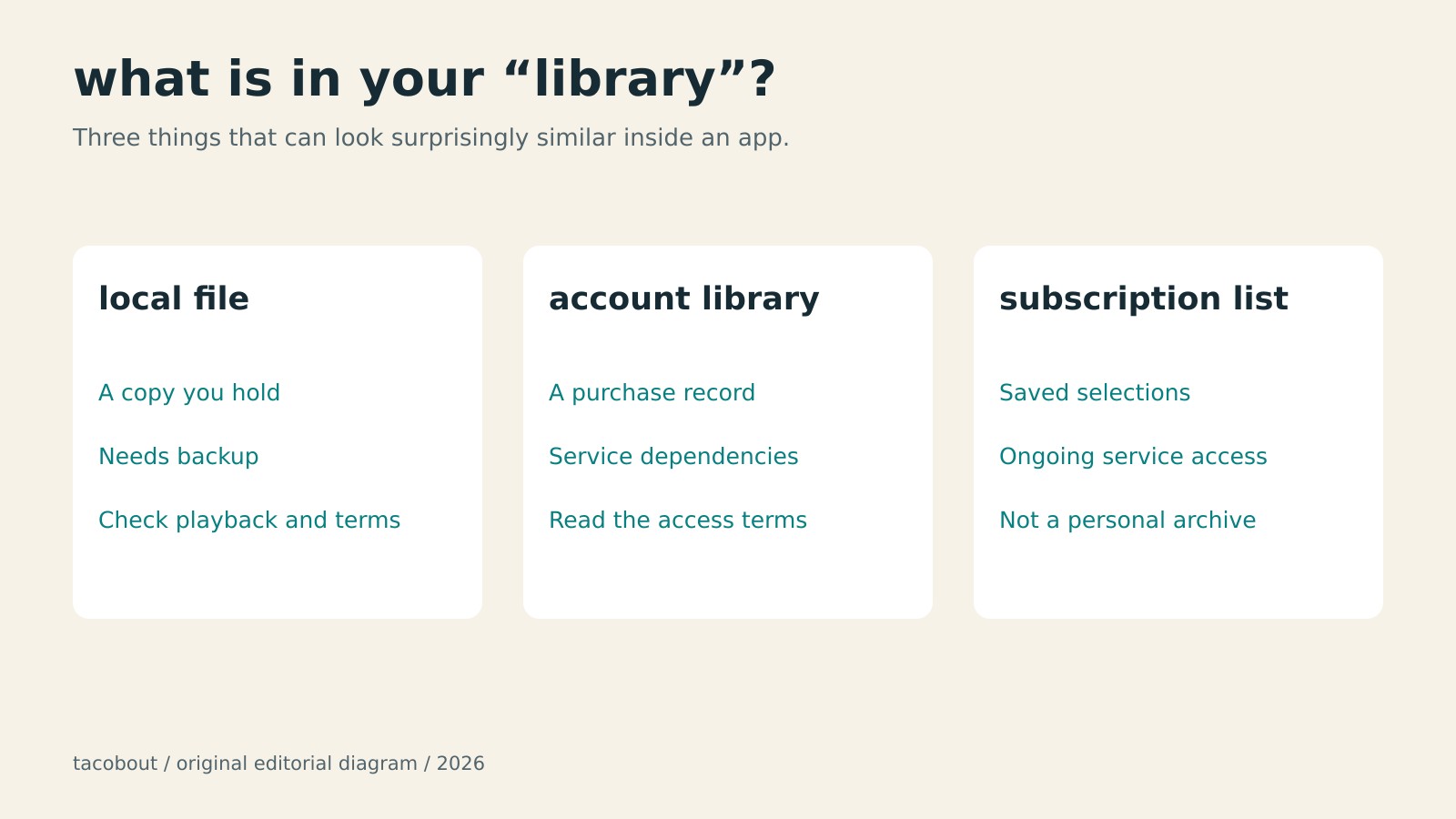
    The word “library” is doing an impressive amount of work. It can mean files on a drive, a shelf of discs, a list of purchases attached to an account, or a subscription’s saved-items screen. These may look similar in an app. They have very different failure modes.

    start with the file, not the button

    Before buying something you want to keep, ask a few boring questions. Does the transaction include a downloadable file? Can an ordinary player open it? Does playback need a particular app, an active subscription, or another authorization check? What does the seller say happens if access changes?

    A download button alone does not answer those questions. An app’s offline feature can be useful without providing an independently usable copy. Likewise, having an account entry marked as purchased is different from having the media saved somewhere you control. Check the actual product and terms rather than assuming a familiar interface means a familiar deal.

    There are straightforward alternatives. Bandcamp says its downloaded audio files are DRM-free. That is a specific technical promise about the downloads, not a transfer of the artist’s copyright. The distinction matters: fewer playback restrictions do not give you permission to republish somebody’s album.

    Before buying digital media, check whether you receive an independent file, how playback is authorized, and what retention is permitted.

    keep the boring part

    Once you have legitimately obtained files you are permitted to retain, actually save them. Keep a second copy separately from the first. Check that the files open. Save the credits, artwork supplied with the purchase, and any accompanying license information. A folder called “Downloads” is a location, not a preservation strategy.

    Cloud convenience can coexist with that small amount of maintenance. It just should not be mistaken for the maintenance. Apple explicitly says Apple Music is not a backup service. Its support guidance also accounts for songs becoming unavailable in the catalog. A service can be very good at playing music today without being your personal archive.

    Physical media has its own chores: storage, working equipment, damage, missing pieces. The point is to know which dependencies you have accepted. Replacing a shelf with an app does not make dependence disappear. It moves it somewhere less visible.

    the legal shortcut is not a shortcut

    The old article treated personal copying much too categorically. In the United States, fair use requires a fact-specific assessment; buying a work does not create a blanket fair-use permission for whatever copying you would find convenient.

    There is a separate complication around bypassing access controls. Section 1201 addresses circumvention, with statutory exceptions and periodically reviewed exemptions. “I paid for it” does not settle that question either. This essay is about choosing and maintaining a collection, not a set of instructions or legal clearance to defeat restrictions.

    DRM-free describes technical restrictions, openly licensed describes reuse permission, and public domain describes copyright status.

    Creative Commons also needs a less magical description than it received in 2009. CC licenses work through copyright, granting permissions under stated conditions. They do not simply erase it. Check the particular license: attribution, commercial reuse, and adaptations are separate questions. DRM-free, openly licensed, and public domain describe different things.

    None of this requires giving up streaming or turning leisure into a records-management job. Use the convenient service for discovery. For the small corner of culture you would be annoyed to lose, pay attention to the format, the terms, and the copies you actually hold.

    Keeping things takes a little work. So does rebuilding a collection from a screen full of unavailable titles. Only one of those chores lets you choose the timing.

    credits

    Source essay: Andrew Schwegler, DRM and Copyright in the 21st Century, Pale Panda, February 11, 2009; the original credits an earlier StandUp Magazine appearance. Original editorial diagrams created for tacobout. Linked product and legal sources checked October 24, 2026; legal discussion is limited to general U.S. context.

  • the export button is not a time machine

    the export button is not a time machine

    From the Pale Panda archive: a new essay built from Andrew Schwegler’s “The Social Media Underdogs,” published October 13, 2009, with background… Read more

    From the Pale Panda archive: a new essay built from Andrew Schwegler’s “The Social Media Underdogs,” published October 13, 2009, with background from “Virb Gives Up On Trying to be Facebook,” 2010. The original observations belong to those dates; the preservation discussion below is new.

    In 2009, Pale Panda surveyed Yahoo! Meme, Posterous, Vox, Virb and Hi5. The question was familiar: surely there had to be something beyond the handful of sites everybody already used.

    Read the roundup now and the interesting part is how many different jobs those sites were supposed to do. Posterous was described as a way to publish once and distribute the result elsewhere. Vox offered a more selective audience. Virb was the promising home for artists whose friends, inconveniently, had other plans. Yahoo! Meme’s limits on customization mattered enough to complain about. A profile was somewhere you put things, arranged things and sometimes expected those things to stay.

    That last expectation deserves more attention than it generally gets during signup.

    the pivot is somebody else’s moving day

    The follow-up on Virb makes a useful companion piece. In 2010, the old blog described a move away from social networking toward a website-building service. The new themes looked good. A portfolio tool sounded useful. The problem was that a useful new product did not necessarily preserve what people had come for.

    The post also raised a much less glamorous concern: getting the old content out. That was Andrew’s contemporary assessment, not a retrospective audit of every export option Virb ever offered. It still points to the right question. If a service changes its purpose, what happens to the work that fitted the previous one?

    “We’re excited about our next chapter” can mean a considerable amount of unpaid administrative work for the people in the last chapter.

    A homepage can survive while its original purpose disappears. A brand can carry on while the conversations, layouts and reasons to visit no longer fit. Counting which companies survived misses that quieter kind of loss.

    Posterous illustrates a different distinction. In the 2009 roundup, its appeal was getting a post onto several services at once. That is distribution. Preservation asks whether the copies remain usable independently, with their photographs and context intact. Publishing everywhere sounds wonderfully permanent until you have to establish what every version actually contains.

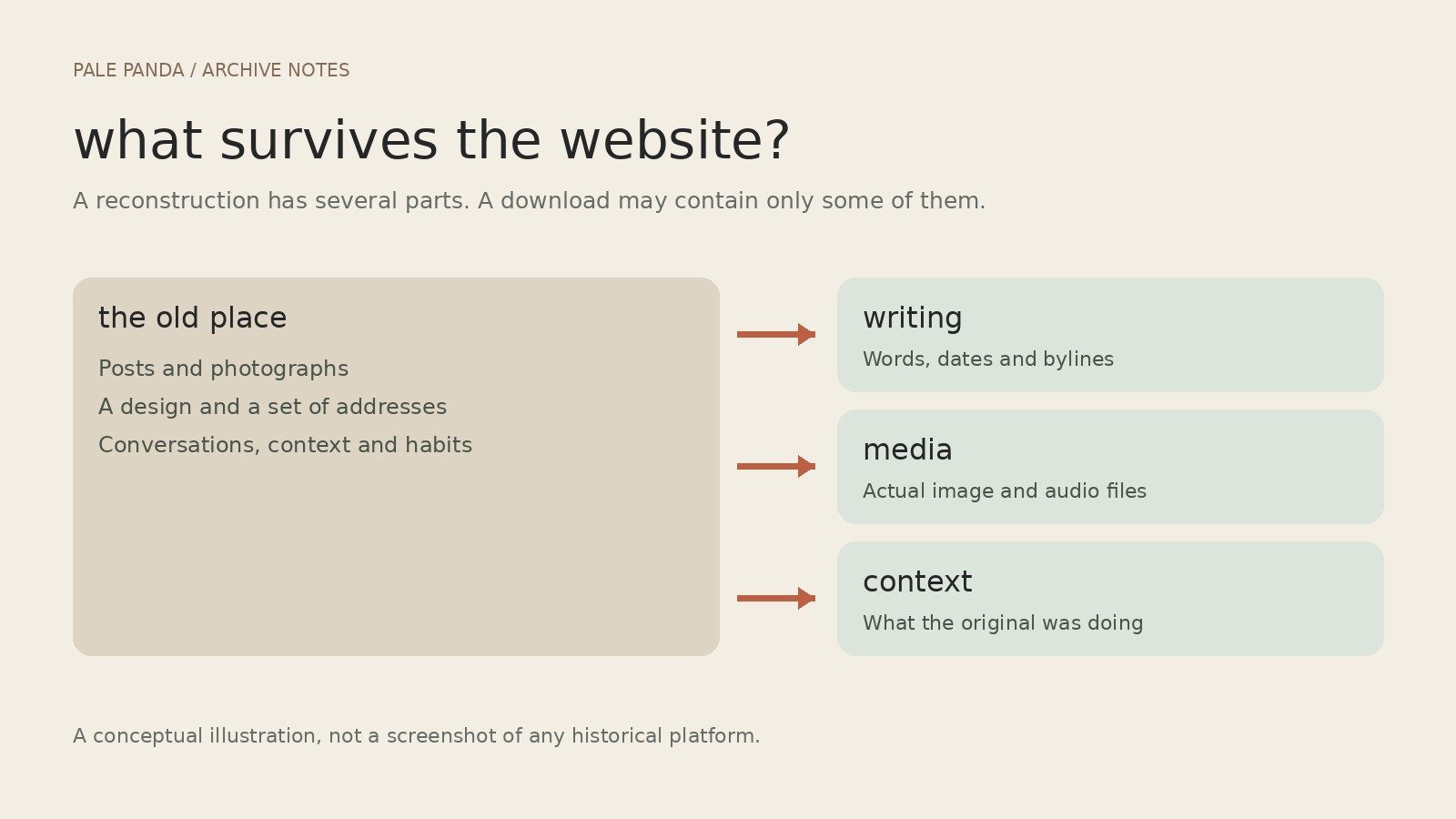
    A WordPress.com content export contains text and an image reference; the actual photograph is a separate file.

    the file is not the website

    Even an export button needs a follow-up question: what, exactly, came out?

    WordPress.com’s export documentation, checked in October 2026, gives a useful concrete example. Its content export contains posts, pages, comments and references to media. It does not contain the actual image files, the theme or design customizations. Images must be copied separately or fetched during the import while the source remains accessible. A successful download can therefore be one part of a recovery, rather than proof that everything is safe. The distinction is spelled out in WordPress.com’s export guide.

    It is easy to understand how this gets missed. A file called an export feels reassuringly complete. Open it and the sentences are there. The photograph may be there only as an address. If the address stops working, the file has preserved a very precise description of where the photograph used to be.

    The same problem applies to a post built around somebody else’s embedded video. Saving the surrounding paragraph does not put the video in a box with it. Links and embeds are useful connections, but they are also dependencies.

    The 2009 original and the 2026 adaptation are kept separate, preserving Andrew Schwegler’s byline and historical point of view.

    save the boring parts

    A sensible archive keeps more than the prose: original media where you have the rights, publication dates, bylines, source addresses and enough notes to distinguish a missing file from something deliberately removed. Then someone has to open the recovered pages and check them. Particularly the pages with images. Particularly the page you assumed would be fine.

    There is a limit to restoration. A download cannot reconstruct every conversation around a post, or make an old recommendation current. It should not quietly turn somebody’s 2009 opinion into their latest position, either. Dates are part of the writing.

    That is a useful standard for bringing Pale Panda into this blog. Keep the authorship. Keep the historical context. Let a new essay be visibly new rather than sanding the year off the old one. Repair what can be repaired without pretending the original room is still there.

    The underdogs roundup was looking for the next good place to put things. Its more durable question is what you can take with you when that place changes its mind.

    sources & credits

    Original writing: Andrew Schwegler, The Social Media Underdogs (Pale Panda, October 13, 2009; recovered post 2301) and Virb Gives Up On Trying to be Facebook (2010; recovered post 2309). Technical reference: WordPress.com, “Export your website’s content”, checked October 24, 2026. This is a new adaptation, not a verbatim restoration. Illustrations: original editorial diagrams prepared for tacobout; these are explanatory graphics, not historical website screenshots.

  • 1
    enough phone: smaller screen, sizeable promises

    enough phone: smaller screen, sizeable promises

    A 5.3-inch Android project, a replaceable battery, and a manufacturing schedule still written in pencil. Read more

    The Enough Phone is trying a radical piece of industrial design: fitting in a hand. Ars Technica has the rundown on the 5.3-inch Android project, which is now crowdfunding rather than sitting on a shop shelf.

    (more…)
    Fediverse Reactions
  • the fediverse is a place you choose, not a promise

    the fediverse is a place you choose, not a promise

    A fresh guide built from Andrew Schwegler’s “What Is the Fediverse?” on Pale Panda, April 20, 2021. This is a new adaptation,… Read more

    A fresh guide built from Andrew Schwegler’s “What Is the Fediverse?” on Pale Panda, April 20, 2021. This is a new adaptation, not the original article. Technical details checked October 24, 2026.

    The useful question about a social network is fairly small: can you talk to the people you want to talk to without hating the place where you do it?

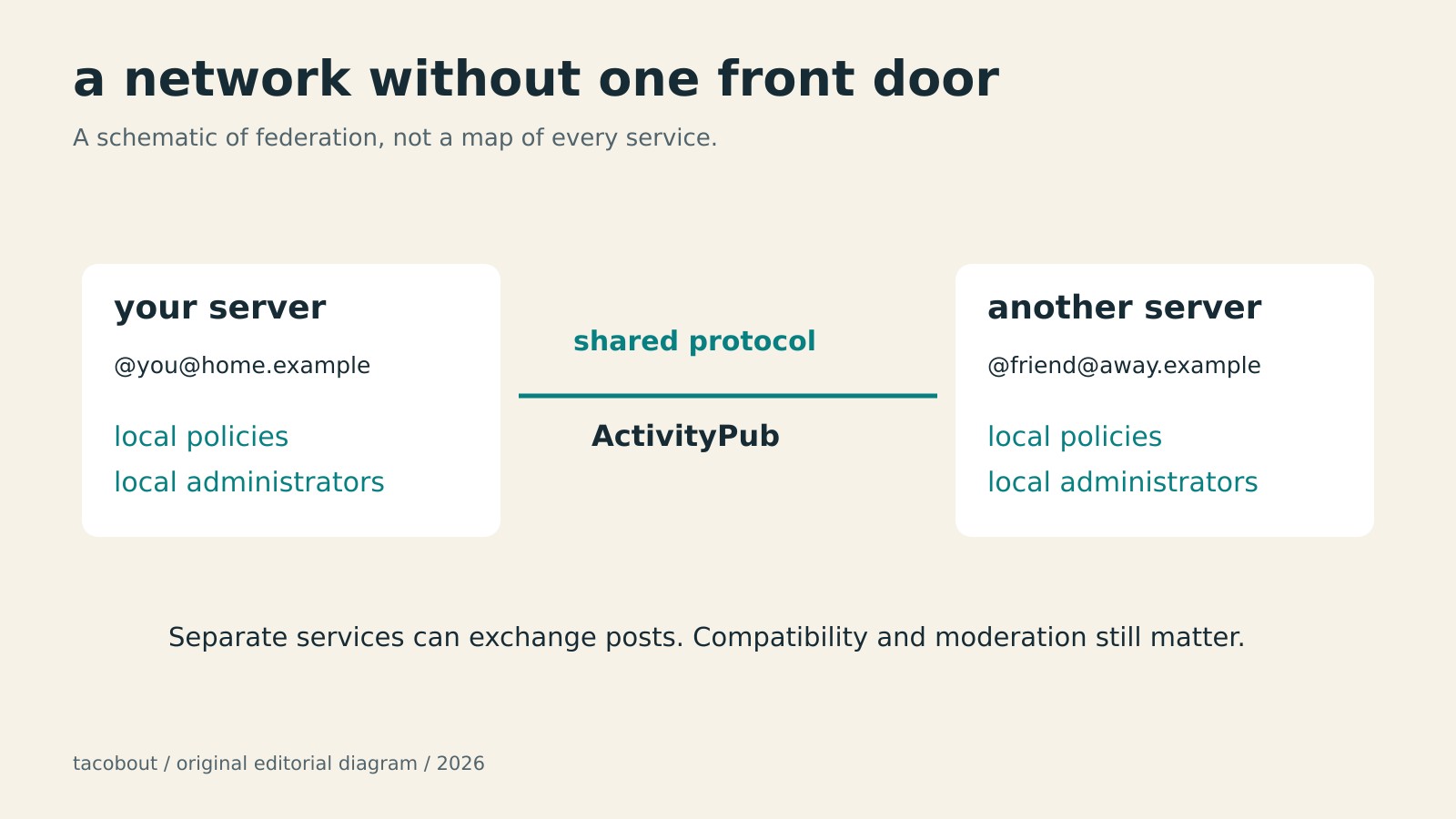
    The fediverse offers a different way to arrange that place. You join a service run by one operator, but your conversations can reach compatible services run by other people. The email comparison from Pale Panda’s original guide still helps: choosing an address should not require everyone you know to choose the same provider.

    ActivityPub is one protocol that makes those exchanges possible. It describes how services deliver social activity to each other. It does not make every application identical, or promise that every server will accept everything another server sends. Think shared language, with local house rules.

    pick the people running the place

    For a first Mastodon account, start with the server directory, then read a candidate’s own policies. The server hosts your account. Its administrators matter more than whether the domain looks cute in your bio.

    Check what the rules prohibit, how to contact moderators, and whether the funding and shutdown policies make sense. Look at public conversations. A rule against harassment is useful; evidence of people maintaining a usable community is better. You are choosing somebody’s ongoing operation, not just a sign-up form.

    Registration can be open, approval-based, or invitation-only. Follow that server’s process. There is no need to join the same server as every friend. There is also no universal promise that two particular servers will communicate: moderation decisions and technical compatibility can limit the connection.

    Three checks before joining a Mastodon server: rules, moderation contacts, and funding or shutdown plans.

    find a person before you find everybody

    Share your complete address, such as @name@example.social, rather than just @name. The domain is part of the address. If you have someone’s profile URL, paste it into your own server’s search box. That is often easier than trying to persuade a page on a different server that you are already logged in somewhere else.

    Hashtags, follows, and conversations are useful starting points. Follow a few people whose posts you actually want to read. Reply when you have something to add. A feed does not become good merely because you have successfully created an account.

    The old guide’s claim that Mastodon cannot search post text needs retiring. Full-text search is available when the server has the necessary search backend. Its searchable material includes public posts from accounts that opt in, alongside certain posts you wrote or interacted with. It is not a search engine for every post on every server. An empty result is not proof that nobody said it.

    private does not mean encrypted

    Mastodon’s private mentions are not end-to-end encrypted messages. Administrators of the sending and receiving servers may be able to access their text. Keep sensitive conversations in an appropriate encrypted messenger. A visibility menu is not a security guarantee.

    The same caution applies to sweeping claims about the whole fediverse. Different operators have different terms, policies, and business models. Federation does not itself guarantee an ad-free service, permanent availability, or perfect moderation. Read the actual agreement rather than the nicest paragraph in an explainer.

    Mastodon can transfer supported lists and followers; an exported archive does not import old posts and media as posting history.

    know what can leave with you

    Mastodon gives you useful exit options, with limits. Its documented migration process can redirect an old profile and move followers where their software supports it. You can export and import supported lists. You can also request an archive of your posts and media.

    Those are different operations. The post archive does not become your posting history on the new server: Mastodon’s documented migration does not import those posts and media. Save anything you need before moving. Nor should deleting an account be treated as proof that every copy, screenshot, or independently retained record has vanished.

    That leaves a reasonably appealing proposition, without the sales pitch. Choose a place with tolerable rules and people worth reading. Learn its limitations. Keep an exit plan. A social network is allowed to be useful without volunteering to become your entire internet.

    credits

    Source essay: Andrew Schwegler, What Is the Fediverse? How to Find the Right Instance, Join, and Search., Pale Panda, April 20, 2021. Original editorial diagrams created for tacobout; schematic illustrations, not archival screenshots. Linked technical documentation was checked October 24, 2026.

  • meet hitch. here’s how to use moots.

    meet hitch. here’s how to use moots.

    moots has a little mint gecko now. meet hitch, then take a practical look at account lookup, blocks sent and received, and… Read more

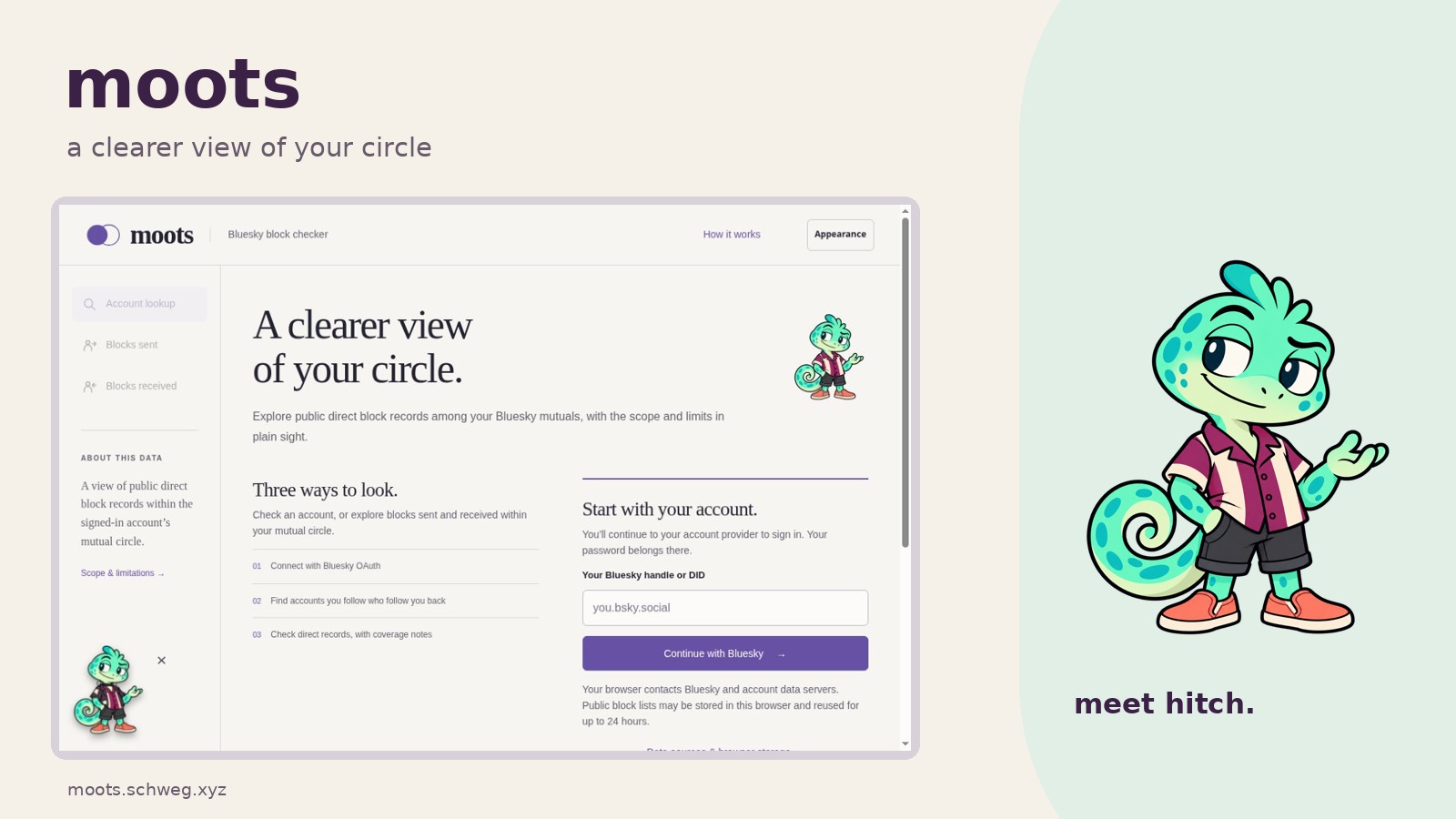
    moots has a little gecko now. his name is hitch. he’s mint green, wears a plum-and-cream shirt, and has apparently decided that coral slip-ons are appropriate footwear for looking through public records.

    he’s the new face of moots, my Bluesky block checker. this seems like a good excuse to explain what the tool actually does. the gecko will be supervising.

    first, whose moots?

    moots starts with the account you sign in with. your circle is the people you follow who follow you back. every view uses that circle, including when you look up somebody else.

    the tool reads public direct block records and lets you look at them three ways: which of your mutuals have a record blocking a particular account, which mutuals have sent blocks to others in your circle, and which have received them from others in that circle. those last two views stay inside your circle. nobody has been appointed commissioner of all of Bluesky.

    1. start with your account

    open moots.schweg.xyz, enter your full Bluesky handle, and choose Continue with Bluesky. a DID, the account’s persistent identifier, works too. most people can stick with their handle.

    Moots sign-in form with schwegler.lol entered in the handle field, above Continue with Bluesky.
    enter your full handle first. i’m using schwegler.lol here; use your own account for your own circle.

    you’ll continue to your account provider to sign in through OAuth. read the authorization screen before approving it. your password goes to your provider; moots doesn’t ask you to make an app password. the current OAuth setup uses the transitional atproto transition:generic scope; review the permissions your provider shows before continuing.

    Bluesky’s sign-in page for schwegler.lol, with an empty password field and the Sign in button. No login has been submitted.
    the next screen belongs to Bluesky. this example stops before entering a password or pressing Sign in.

    2. choose what you want to check

    Account lookup: enter the handle or DID of the account you want to check, then choose Check account. a matching row means someone in your mutual circle has a public direct block record naming that account. the direction is your mutual → the account you entered. entering somebody else’s handle doesn’t switch the scan to their mutuals.

    Blocks sent: choose Scan blocks sent to see which accounts in your circle have direct block records naming other accounts in that same circle. open a row to see the accounts on the receiving end.

    Blocks received: choose Scan blocks received to look in the other direction. a row’s count is how many other members of your circle have direct block records naming that account. open its details to see who those records came from.

    the sent and received views sort by observed count. you can filter the results or change the sort. a bigger number still only describes the records found within this particular circle.

    Moots’ How it works panel explains that account lookup uses the signed-in account’s mutual circle and shows the direction of direct block records.
    How it works is available before sign-in, if you want to check the three views and their limits first.

    3. read the coverage before the conclusion

    the results show how many mutuals were fully checked, how many were incomplete, and how many block lists came from the browser’s cache. a server can time out or hit a rate limit. an incomplete scan can miss matches, and counts may be lower than the full picture.

    use Retry incomplete to try the unfinished accounts again, or Refresh circle & records to request a fresh circle and fresh records. cached lists can be reused for up to 24 hours; the results flag them and show the oldest cached list’s fetch time.

    “nothing found” means nothing matched in the records available for that snapshot. list-based blocks and mutes are outside the scan. records can also change after you check.

    the browser storage bit

    the analysis happens in your browser, which contacts Bluesky, identity services, and the servers holding account data. those services may log requests. moots can’t promise an anonymous lookup.

    successful block lists are stored in the browser and remain until overwritten or cleared, even after their 24-hour reuse window ends. the mutual-circle cache is reused for up to 15 minutes. signing out clears that circle cache, but leaves the stored block lists.

    to remove cached scan data, open Data sources & browser storage or Scope & limitations and choose Clear cached scan data. clearing it leaves your OAuth session unchanged, so use Sign out separately when you’re finished.

    Moots’ data and browser storage panel, including the Clear cached scan data button and notes about cache retention and public records.
    the storage panel explains what stays in this browser and gives you a button to clear cached scan data.

    a record has limits

    a block record doesn’t tell you why it exists. it doesn’t establish a block in the reverse direction, explain a relationship, or give you a reason to hassle somebody. people get to set boundaries without providing a footnote.

    moots is an independent tool, unaffiliated with Bluesky. if you want to look under the hood, the source is on GitHub. otherwise, start here. hitch is already dressed.

  • the local file has better bedside manner

    the local file has better bedside manner

    the cloud keeps promising my movie collection is safe, then asks me to download it before i can watch it. Read more

    the modern arrangement for owning a video is very polite until you ask it to behave like ownership. the file is in the cloud. the cloud is everywhere. the cloud will absolutely need several minutes alone with the file before it can show it to you.

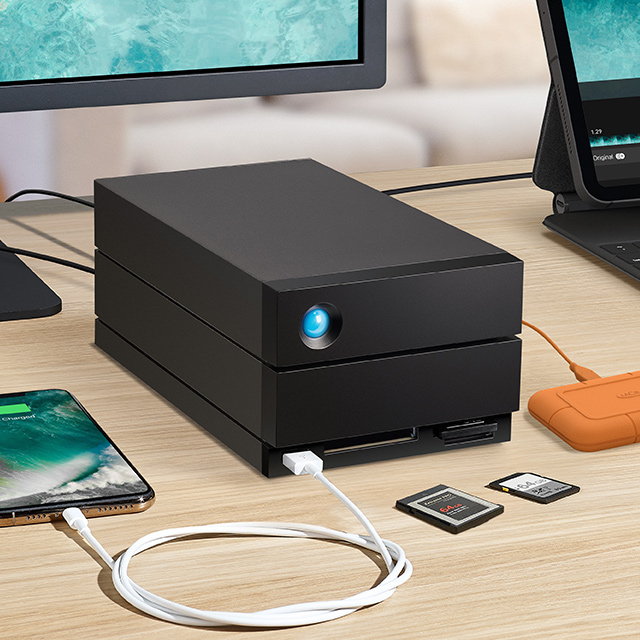
    External hard drive on a desk
    Image: Xataka

    this is why a local library still feels faintly revolutionary. not because i am trying to recreate a server room in my apartment, although any external hard drive immediately develops the emotional gravity of a server room. it is because pressing play should not begin a negotiation.

    i like a service that remembers where i was, offers subtitles, and does not make me think about codecs. i also like knowing that the thing i saved is still there if a licensing deal, a redesign, or a very confident progress bar changes its mind.

    Portable Seagate external drives
    Image: Seagate

    the local file is not glamorous. it is just sitting there, ready when asked. frankly, that is more intimacy than most platforms offer.

  • mike huckabee would like custody of the produce aisle

    mike huckabee would like custody of the produce aisle

    Mike Huckabee tried to turn cherry tomatoes, seedless watermelons, GPS, cell phones, and USB drives into a geopolitical loyalty test. The inventions… Read more

    I reblogged a post fact-checking Mike Huckabee’s claim that people who oppose Israel should surrender a small pile of modern conveniences, including cell phones, car navigation, USB drives, cherry tomatoes, and seedless watermelons. Apparently the produce aisle is part of the diplomatic corps now.

    The clip comes from a speech Huckabee gave at the Tel Aviv Stock Exchange’s Atlas Award ceremony in May. He told Israel’s critics, in effect, that rejecting the country should mean giving up everything it had supposedly invented. The list has continued circulating because it is an unusually pure example of a familiar political maneuver: take a complicated history, put little national flags next to each object, and then present grocery shopping as a binding referendum on foreign policy.

    There are two problems here. The obvious one is that several claims are wrong. The more interesting one is that even the claims containing a piece of truth do not prove what Huckabee wants them to prove.

    the watermelon has declined citizenship

    A halved seedless watermelon showing red flesh with only small pale undeveloped seeds
    Seedless watermelon. Photo by Scott Ehardt, public domain, via Wikimedia Commons.

    The modern seedless watermelon was developed from triploid breeding work by Japanese plant scientist Hitoshi Kihara beginning in the late 1930s. The National Watermelon Promotion Board traces it to Kihara’s research in Japan, and the University of Illinois Extension explains the chromosome trick that makes the fruit mostly sterile.

    Israel has absolutely done important agricultural research. That does not cause Professor Kihara to vanish in a puff of patriotic PowerPoint transitions.

    the cherry tomato contains a smaller, more annoying truth

    Red cherry tomatoes arranged in a clear plastic produce package
    Cherry tomatoes. Photo by Evan-Amos, CC0, via Wikimedia Commons.

    Cherry tomatoes existed centuries before the state of Israel. Tomato domestication reaches back through Indigenous agriculture in the Americas; the historical record is complicated, but it is not hiding a surprise origin story in a Jerusalem laboratory. A USDA-indexed review describes the competing South American and Mexican domestication histories, while a scholarly history of the specific Israeli claim found references to cherry-shaped tomatoes going back hundreds of years.

    Israeli scientists Nachum Kedar and Haim Rabinowitch did make an important contribution. They bred varieties with better flavor, longer shelf life, and qualities that made cherry tomatoes easier to sell commercially. Hebrew University’s own profile of Kedar’s work emphasizes long shelf life, taste, and disease resistance. That is real work. It is just not the same sentence as “invented cherry tomatoes.”

    This is how the myth stays alive: a meaningful improvement gets promoted into immaculate conception because “helped turn an existing crop into a global supermarket product” will not fit on the bumper sticker.

    the USB drive has several fathers and would like them to stop fighting

    A small silver-and-black USB flash drive viewed from above
    USB flash drive. Photo by Dori, public domain, via Wikimedia Commons.

    The USB flash drive is the claim where the corrective reblog also becomes too tidy. Israel’s M-Systems filed a 1999 patent for a USB-based flash disk, and Dov Moran is often credited as one of its inventors. Singapore’s Trek 2000 was the first company known to sell a product under the ThumbDrive name. IBM engineer Shimon Shmueli submitted a competing invention disclosure, and China’s Netac filed its own patent claim. IEEE Spectrum and the National Library Board of Singapore both tell the story as a genuine dispute, not a clean national trophy presentation.

    And the object itself depended on Japanese flash memory, the multinational development of the USB standard, semiconductor manufacturing across countries, and years of engineering that do not become less important because one patent arrived first.

    innovation is a terrible loyalty oath

    Car navigation is the same sort of category error. The underlying GPS network is a U.S.-owned system operated by the U.S. Space Force. Japanese automakers pioneered early in-car navigation systems. Israeli-founded Waze later made an enormous contribution to turn-by-turn, traffic-aware navigation. “Car navigation” is not one invention sitting in a glass case with one flag behind it. It is a stack.

    Cell phones are a stack, too. So are computers, medical tests, crops, and nearly every other thing politicians like to assign to a country when they need history to perform a little unpaid public relations.

    But suppose Huckabee’s entire list were accurate. Suppose one country had single-handedly invented every object on it, plus the air fryer and the little plastic table that keeps pizza boxes from touching the cheese. That still would not settle a political argument about what a government is doing now. A useful invention is not a moral gift card that can be redeemed against criticism forever.

    My phone can contain Israeli technology, American technology, Japanese technology, Chinese manufacturing, Taiwanese chips, and code written by somebody in Poland who has not slept since Tuesday. None of those facts requires me to outsource my conscience to the supply chain.

    The most honest version of this story is also the least useful for propaganda: people in different places built on one another’s work, sometimes cooperatively, sometimes competitively, and usually messily. The watermelon is Japanese science grown from an African crop. The tomato is Indigenous American agriculture reshaped by breeders around the world. The USB drive emerged from overlapping claims across Israel, Singapore, China, Japan, and the United States.

    Huckabee wanted a shopping list of reasons criticism should stop. What he accidentally assembled was a pretty good argument against treating human knowledge as national property.


    Source note: The speech was delivered in May 2026; contemporary context is available from Middle East Eye. Featured image: official 2025 portrait by the U.S. Embassy in Israel, public domain, via Wikimedia Commons.

  • 5
    mapquest found the fastest route back to relevance

    mapquest found the fastest route back to relevance

    an ancient mapping service declined one pointless authoritarian branding exercise and discovered that “no” is still a very popular feature. Read more

    MapQuest, a website I associate primarily with printing six pages of directions and then immediately missing the second turn, is suddenly the most politically relevant mapping service in America.

    President Trump ordered Lake Ontario renamed “Lake America.” Google and Apple changed the label for users in the United States. MapQuest said no, kept the familiar name, and watched people download its app in numbers normally reserved for products they remembered existed before that morning.

    MapQuest is now the No. 1 U.S. app after bucking Trump’s ‘Lake America’ renaming

    — TechCrunch (@techcrunch.com) 2026-09-02T20:13:34.306Z

    TechCrunch reported on August 31 that MapQuest had reached No. 1 in the U.S. Navigation category, No. 4 among non-game apps, and No. 8 across the entire App Store. The company said usage had jumped to 50 times its normal level. By September 2, the Associated Press reported that it had topped the free-app charts in both the United States and Canada.

    MapQuest mobile app showing a driving route, travel time, traffic level, and a green Start button
    MapQuest app promotional screenshot, via the Apple App Store; reproduced for commentary.

    the ancient texts foretold this

    I remember MapQuest as infrastructure from the era when going somewhere new required a printer, a passenger willing to read aloud, and a solemn family agreement that nobody would mention the missed exit until Dad had finished being mad at the interstate. You did not “reroute.” You performed a three-point turn in a bank parking lot and hoped geography eventually forgave you.

    Google Maps made all of that feel prehistoric. Apple Maps arrived later, initially with the confidence of a person who had never personally encountered a bridge. MapQuest remained alive in the background, apparently waiting for the exact moment that declining to participate in a pointless act of nationalist branding would qualify as product innovation.

    Map showing Lake Ontario highlighted in red between Canada and the United States
    Map by Phizzy, via Wikimedia Commons, licensed CC BY-SA 3.0.

    sometimes “no” is a feature

    The funny part is that MapQuest says it is not trying to make a grand political statement. General manager Doug Berger framed the decision as keeping the names users already know. This is technically customer service, which now counts as resistance because the baseline is apparently “change the map whenever the president invents a new noun.”

    There is a useful lesson here for brands, institutions, and the many Democrats who react to every absurd demand by assembling a committee to determine how quickly they should comply. People are desperate to see somebody say no. It does not need to be delivered from a barricade. It can be a mapping app calmly declining to pretend that one of the Great Lakes received a patriotic software update.

    MapQuest also released a tool that lets users give the lake their own joke names. This is both clever marketing and an appropriate response to governance by novelty merchandise. If the federal government is going to operate like a novelty T-shirt kiosk, the least the rest of us can do is make better jokes.

    I do not know whether everybody downloading MapQuest will keep using it. Protest downloads are easy, and changing a default navigation app is harder than people admit. But even a temporary surge matters. It demonstrates that refusing to normalize something stupid can be popular, useful, and, most offensive to conventional wisdom, good for business.

    Thirty years after helping America get lost with a stack of warm printer paper, MapQuest has found the route back to relevance. It was apparently just “continue straight past the authoritarian branding exercise.”

    Fediverse Reactions